

Go (Golang) is an open-source programming language developed by Google. Known for its simplicity, concurrency support, and high performance, Go is widely used for modern backend systems, cloud-native applications, and Web3 projects.
If you’re running Ubuntu 24.04 LTS, here’s how to install the latest Go version step by step.
Step1. Verify if snap list command can be executed
sudo snap lisstStep2. Get go version list that can be installed
sudo snap info go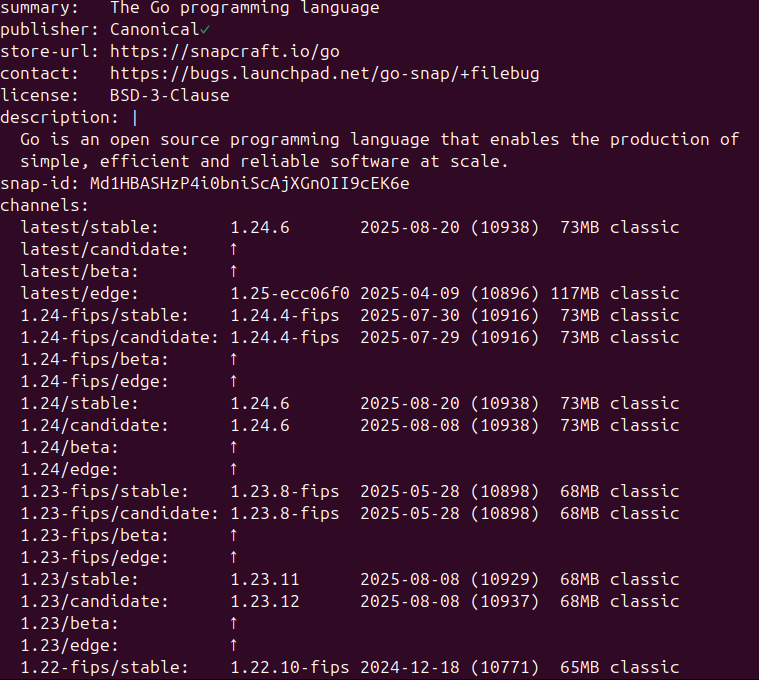
Step3. Choose a stable version to intall (for example 1.24/stable)
sudo snap install go --channel=1.24/stable --classicExplanation:
--channel=1.24/stable→ ensures you’re installing the stable Go 1.24 release.--classic→ enables classic confinement for wider compatibility.
Step4. Check the installation is successful
go versionExcpected output:
go version go1.24.6 linux/amd64
Notes:
If you want to reinstall go, use the following command to uninstall the existing one before the installation
sudo snap remove go